
 Posted by
 TFT RAMDISK Tools v1.0.0.0.0 Beta (Latest version) Complete Guide (2026)
Introduction
TFT RAMDISK Tools is a fantastic offline PC setup that allows users to perform crucial tasks on Apple devices effectively. Designed for Windows 10 and Windows 11, this tool can also be useful for older versions of Windows, with a standalone installation that ensures hassle-free use. For Indian users, accessing this tool on your PC is essential to efficiently manage your device. Best of all, you can enjoy a free trial before committing, making it an excellent choice for those looking to explore its features. If you’re eager to know more about similar tools, check out Halabtech Tool.
What This Mobile Tool Does ?
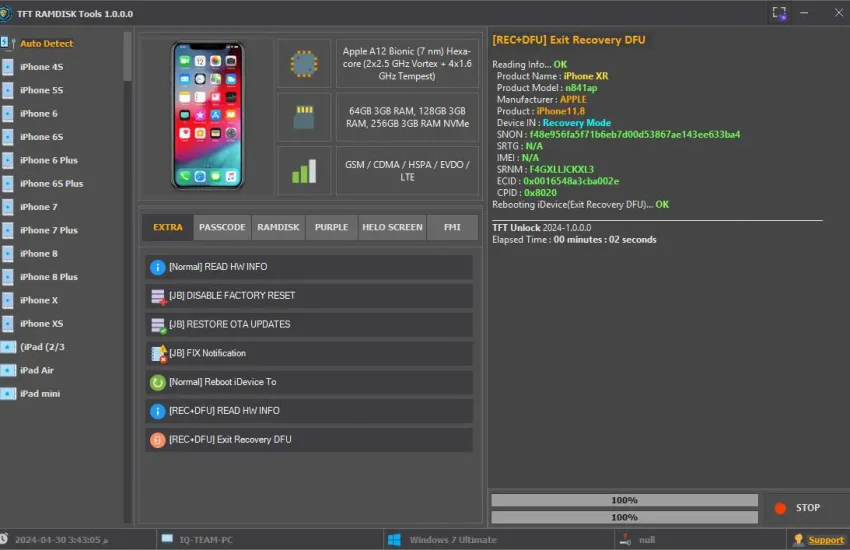
TFT RAMDISK Tools serves as a crucial cog in the wheel for many developers and mobile device technicians. It is primarily designed to assist in bypassing various security features on Apple devices, including passcode and iCloud Activation lock. The tool utilizes methods like Jailbreak, Ramdisk, and Purple approaches to ensure that you can unlock your device swiftly and securely. For developers, having the ability to manipulate device information (such as changing the serial number or accessing MDM) is invaluable. It gives you the potential to restore devices without much hassle, particularly important in a game development environment where testing and accessing different device states can be critical.
Tools Key Features
- Passcode Backup: Allows full backup of device passcodes for restoration.
- Erase All Content: Completely wipes device data.
- Restore Backup: Facilitates the restoration of previously backed up information.
- Get Activation Change SN: Enables SN change during activation.
- Bypass Hello: Skips the initial setup process after device reset.
- Fix Mount [iPWNDFU]: Fixes mounting issues during DFU mode operations.
- Boot Purple [iPWNDFU]: Boots device into a special mode for further manipulation.
- Write Serial/Bluetooth/Wifi/Ethernet: Allows writing of necessary device identification information.
- Read HW Info [DIAG]: Reads the hardware information of the device for diagnostics.
- Unlock WiFi [DIAG]: Unlocks WiFi functionality on the device.
- Untethered Bypass [MEID]: Provides a bypass option without requiring connectivity.
- Untethered Bypass [GSM]: Similar functionality aimed at GSM networks.
- Hidden iCloud: Ability to hide iCloud status on the device.
- Fake iOS Version: Spoofs the displayed iOS version on the device.
- Hide Software Update: Prevents software updates from being displayed.
- Reboot iDevice Options: Includes various reboot methods for testing.
- Exit Recovery/DFU: Safely exits device recovery or DFU mode.
- Read Info [Normal]: General reading of device information.
System Requirements
| OS | Windows 10 / 11 |
| CPU | Intel or AMD with SSE2 support |
| RAM | At least 4GB |
| Storage | Minimum 1GB available space |
| Others | Apple USB driver required |
How To Download and Install ?
To get started with TFT RAMDISK Tools, follow these simple steps:
- Download: Use the provided links to download the tool.
- Offline Setup: Ensure your PC is ready to operate offline.
- Standalone Installation: Execute the installer without any dependencies needed.
- Extraction: Extract the downloaded zip file to a convenient location on your PC.
- First Launch: Double-click the application icon to start using the tool.
Common Errors and Fixes
| Error | Fix |
|---|---|
| USB Driver not detected | Ensure Apple USB drivers are installed correctly. |
| Installation failure | Check system requirements; ensure adequate space and permissions. |
| Application not starting | Restart the system and launch the app again. |
| Incompatibility issue | Verify that your Windows version is compatible with the tool. |
Performance And Usage of TFT RAMDISK Tools v1.0.0.0.0 Beta (Latest version)
The performance of TFT RAMDISK Tools is overwhelmingly positive, especially in terms of speed and efficiency. The standalone nature of the application means it runs smoothly without additional software dependencies. When using it for tasks like bypassing activation locks or restoring from backups, you’ll find that it handles operations quickly, allowing developers to focus on their work rather than troubleshooting the tool itself.
In practical use, the tool has proven effective for gamers needing to test applications on different device states. It can emulate various activation locks and bypass scenarios, which is invaluable for developers. It’s straightforward to pull information or change device settings, ensuring you get straight to what matters – developing and testing apps.
TFT RAMDISK Tools v1.0.0.0.0 Beta (Latest version) Pros And Cons
- Pros:
- Easy to use interface for all levels
- Fast processing and execution of tasks
- Wide range of features covering various use cases
- Frequent updates enhance functionality
- Standalone installation with no dependencies
- Affordable pricing with a free trial
- Cons:
- Limited support for non-Windows devices
- Some features may require deeper technical knowledge
- Occasional connectivity issues with Apple devices
- Requires no active internet connection for initial setup
- Potential compatibility issues with older machines
Related Tool Name must mentioned the name
While TFT RAMDISK Tools shines in its capabilities, there are other tools available that offer similar functionalities. If you’re looking for alternatives, you might want to consider UMT Huawei Suit and UMT GSM Tool. Each of these tools comes with its own set of features that cater to different needs, whether it’s unlocking devices, changing settings, or even bypassing security features. Exploring these options can be beneficial depending on your specific case scenarios.
Moreover, checking out GSM Sheild ISP Tool can also present you with additional solutions that might be tailored for various mobile devices. Understanding your needs and the limitations of each tool will help you make a thoughtful choice.
FAQ
What devices are compatible with TFT RAMDISK Tools?
It is primarily compatible with Apple devices running iOS.
Is TFT RAMDISK Tools free to use?
Yes, it offers a free trial version for users to test.
Can I use it on other operating systems?
No, it is specifically designed for Windows OS because of the dependencies on specific drivers.
What should I do if I encounter installation issues?
Check your system specifications to ensure compatibility and re-download the installer.
How frequently is the tool updated?
The tool is regularly updated to incorporate new features and patches.
Do I need an internet connection to use it?
No internet connection is necessary for the basic operations once installed.
Can I bypass iCloud Activation Lock with this tool?
Yes, the tool has a dedicated feature for bypassing the iCloud Activation Lock.
Is technical knowledge required to operate it?
While the tool is user-friendly, some technical knowledge can be beneficial for advanced features.
Can it change the serial number of devices?
Yes, it has features for changing the serial number among other device modifications.
How do I contact support for the tool?
Support details can generally be found on the official website for TFT RAMDISK Tools.
Is the installation process straightforward?
Yes, the installation process is designed to be simple and user-friendly.
Conclusion
In 2026, as mobile technology continues to advance, tools like TFT RAMDISK Tools v1.0.0.0.0 Beta remain crucial for developers and technicians dealing with Apple devices. Whether you’re troubleshooting or enhancing device functionality, this software offers indispensable features that save time and improve efficiency. Make sure to explore it and stay updated with new features to maximize its potential.
Download Links for TFT RAMDISK Tools 🖥️
| Download Option | Link |
|---|---|
| MediaFire 🗂️ | Download Here |
| Google Drive ☁️ | Download Here |
Feel free to click on the links above to download the TFT RAMDISK Tools for Windows! 📥