
 Posted by
 TFM Tool Pro MTK v1.2.0 Setup File Complete Guide (2026)
Introduction
TFM Tool Pro MTK v1.2.0 is a powerful software designed for offline PC setup that allows you to manage and repair MediaTek powered smartphones and tablets. This tool provides a standalone installation for easy use on your computer, and it’s compatible with Windows 10 and Windows 11+, and even older Windows versions. It’s available for users in India, offering a free trial for hands-on exploration. You can find more information about this tool on our detailed page.
What This Mobile Tool Does?
TFM Tool Pro MTK is essential for anyone dealing with MediaTek devices. Whether you’re looking to flash stock ROMs, reset screen locks, or tackle FRP issues, this tool has got you covered. It offers a practical solution for game developers or enthusiasts who may want to reset devices back to original settings after extensive modifications or testing. With this tool, you can ensure that the system runs smoothly, whether you’re gaming or just using it regularly.
Tools Key Features
- Flash Stock ROM: Easily write stock firmware on MediaTek devices.
- FRP Reset: Remove Factory Reset Protection on supported devices.
- Screen Lock Reset: Bypass or reset screen locks efficiently.
- IMEI Repair: Fix issues related to IMEI numbers on your device.
- Multi-Device Support: Works with a variety of brands including Oppo, Vivo, Xiaomi, and more.
- USB Driver Integration: Comes with MTK USB drivers for easy connectivity.
- Scatter File Support: Flash using scatter files for enhanced compatibility.
- User-Friendly Interface: Simple and intuitive interface for easy navigation.
- Data Backup: Safeguard important data before performing any operations.
- Fast Operation: Quick flash and reset processes to save your time.
- Free Trial Version: Test the tool before making any purchase decisions.
- Reliable Performance: Proven efficiency in restoring device functionality.
- Regular Updates: Continuous improvements thanks to developer support.
- Repair Various Issues: Handle boot loops and system crashes easily.
- Compatibility Check: Ensures your device is supported before operations.
- Documentation Included: Manuals for guided installation and troubleshooting.
- Community Support: Access to forums for help and assistance.
- Custom Patch Options: Additional tools to cater to specialized needs.
System Requirements
| OS | Windows 10 / 11 |
| CPU | Intel or AMD processor with at least 1 GHz speed |
| RAM | Minimum of 4 GB |
| Storage | At least 600 MB of free space |
How To Download and Install?
Getting started with TFM Tool Pro MTK is straightforward. Follow these steps for a smooth installation:
- Offline Setup: Download the setup file from the provided mirror links below.
- Standalone Installation: Run the downloaded file and follow the installation instructions on the screen.
- Extraction: Once the installation is complete, extract the tool if provided in a zip format.
- First Launch: Open the tool after installation and ensure all components are working correctly.
Common Errors and Fixes
| Error | Fix |
|---|---|
| Unable to detect device | Ensure MTK USB driver is installed correctly. |
| Flash failed | Check if the scatter file is compatible with the device. |
| Tool crashing on startup | Reinstall the tool ensuring no previous versions are present. |
| USB connection error | Try different USB ports or cables. |
| Lack of permissions | Run the tool as an administrator. |
Performance And Usage of TFM Tool Pro MTK v1.2.0 Setup File
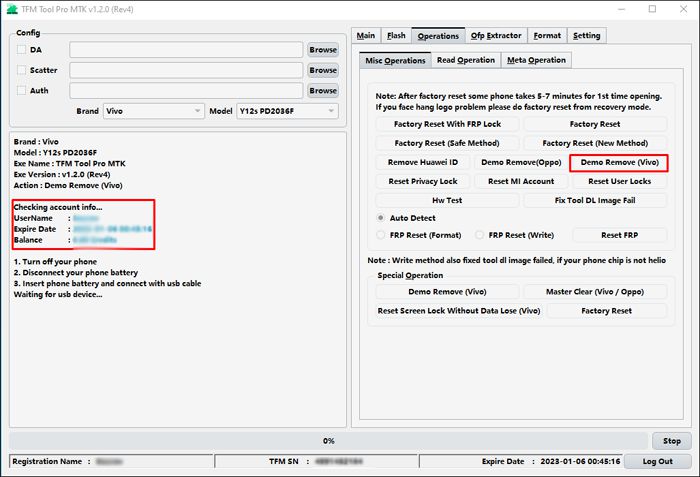
Experience seamless performance with TFM Tool Pro MTK when managing your MediaTek devices. Once installed, users can expect swift operations, whether it’s flashing a new ROM or resetting FRP locks. The tool’s interface is designed for both beginners and experienced technicians, ensuring that users can perform tasks without extensive prior knowledge.
Additionally, TFM Tool Pro MTK provides excellent stability, minimizing errors during operations. Many users report successful flashing processes without encountering major problems, allowing for a productive workflow. The efficiency and reliability of this tool make it a crucial asset in mobile device management.
TFM Tool Pro MTK v1.2.0 Setup File Pros And Cons
- Pros:
- Offers comprehensive device support.
- User-friendly interface.
- Free trial for beginners.
- Fast and reliable flashing operations.
- Helpful community support and documentation.
- Regular updates from developers.
- Cons:
- Requires MTK USB drivers for full functionality.
- Some advanced features may be limited in the trial version.
- Potential compatibility issues with certain devices.
- Initial setup can be confusing for inexperienced users.
- Backup of data required before firmware operations.
- Limited support for devices outside MediaTek ecosystem.
Related Tool Name must mentioned the name
If you’re looking to explore more mobile tools that cater to similar functionalities, consider looking into Halabtech Tool for flashing, or UMT Huawei Suit for Huawei devices. Additionally, UMT Huawei Flasher offers similar services tailored for enthusiasts of that brand. Tools like the GSM Sheild MTK can also provide immense help, especially for users who manage multiple devices at once.
Remember that these tools often have community forums for support, so you can share experiences and get help with any challenges you encounter. Don’t hesitate to explore these options!
FAQ
What is TFM Tool Pro MTK?
TFM Tool Pro MTK is a software designed for performing various tasks on MediaTek powered smartphones, including flashing firmware and resetting locks.
Is TFM Tool Pro MTK free to use?
Yes, it offers a free trial version for users to test its features.
Can I use TFM Tool on Windows 7?
While primarily designed for Windows 10 and 11, it may work on Windows 7, but compatibility can’t be guaranteed.
How do I bypass FRP using this tool?
Connect the device to the PC, and select the FRP reset option in the Service tab of the tool.
Will my data be lost after using this tool?
Yes, data loss can occur during flashing processes; ensure backups are made before proceeding.
Do I need special driver installations?
Yes, you need to install MTK USB drivers for the tool to detect your device.
Can I use TFM Tool for other brands?
No, it is primarily designed for MediaTek devices.
Is there a community for support?
Yes, users can find help on various forums and online communities dedicated to mobile tools.
How can I get further updates?
Stay connected with the official website or user forums for the latest updates and announcements.
Is this tool safe to use?
Yes, as long as downloaded from official sources, it has been scanned for viruses.
What should I do if I encounter errors?
Refer to the common errors and fixes table or engage with community forums for assistance.
Conclusion
In conclusion, TFM Tool Pro MTK v1.2.0 is a remarkable tool for any user dealing with MediaTek devices. Its user-friendly interface, efficient performance, and comprehensive features make it invaluable in handling various mobile repair tasks. As technology continues to evolve, such tools become essential for developers and users alike, ensuring a hassle-free experience in managing devices, particularly as we head further into 2026.
📥 Download Links for TFM Tool Pro MTK v1.2.0
Here are the available download links for the TFM Tool Pro MTK v1.2.0. Choose one that fits your needs!
| 🗂️ Mirror | 🔗 Download Link |
|---|---|
| Mirror 1 (AFH) | Download from Android File Host |
| Mirror 2 (G Drive) | Download from Google Drive |
🌐 Additional Notes
- File Size: 589 MB
- Supported Operating System: Windows (x64, x86/32)
Make sure to click one of the links to download the setup file that suits your device!