
 Posted by
 TFM Tool Pro MTK v1.0.4 Setup File Complete Guide (2026)
Introduction
TFM Tool Pro MTK v1.0.4 is an essential offline PC setup that allows users to work on their MediaTek smartphones and tablets. It’s a standalone installation suitable for Windows 10 and Windows 11, as well as older versions of Windows. This tool is designed specifically for Indian users who need to perform various tasks, including flashing stock ROMs, resetting screen locks, and fixing IMEI issues. For those looking for free trial or official access, this tool offers a great opportunity. To know more, visit this link.
What This Mobile Tool Does?
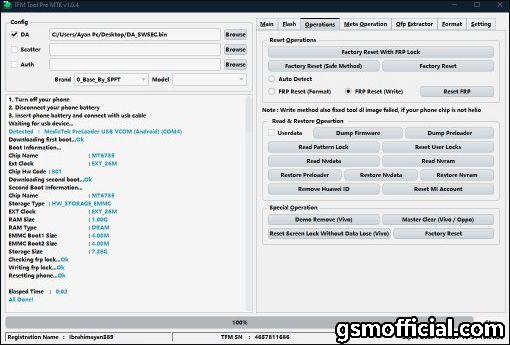
TFM Tool Pro MTK is not just a regular flashing tool; it comes with a plethora of functionalities that cater specifically to MediaTek devices. This tool helps you write stock ROMs, which is essential for restoring devices to their original state. Whether you’re a developer testing applications or a gamer looking to revamp your gaming experience by customizing firmware, this tool has got you covered. Additionally, it assists in bypassing FRP (Factory Reset Protection) and managing elements like screen locks and IMEI numbers, making it highly versatile for both developers and users.
Tools Key Features
TFM Tool Pro MTK Features
- Flash Stock ROM: Easily flash scatter files on MediaTek devices.
- Reset Screen Lock: Unlock your device effortlessly.
- IMEI Repair: Fix your device’s IMEI with a few clicks.
- FRP Unlock: Bypass Factory Reset Protection.
- Support for Latest Devices: Compatible with recent models from Oppo, Vivo, Xiaomi, etc.
- Backup and Restore: Backup your data before making changes.
- Driver Installation: Integrates MTK USB drivers for smooth operation.
- User-friendly Interface: Simplified navigation for an excellent user experience.
- Standalone Application: No need for additional software installations.
- Multi-language Support: Various languages cater to a broader user base.
- Force Upgrade: Upgrade your device’s firmware securely.
- Compatible with 32/64-bit OS: Works perfectly on all Windows versions.
- Real-time Flashing Progress: Keep track of your flashing process.
- Full Documentation: Comes with manuals and guidelines for first-time users.
- Safe and Secure: Scanned and verified with antivirus tools.
- Offline Mode: No internet connection required once installed.
- Fast Performance: Quick flashing and reset times compared to similar tools.
System Requirements
| OS: | Windows 10 / 11 / Older Versions |
| CPU: | Intel or AMD Processor |
| RAM: | 4GB Minimum |
| Storage: | 600 MB Free Disk Space |
How To Download and Install?
To get started with TFM Tool Pro MTK, follow these simple steps for offline setup and standalone installation.
- Download the tool from one of the mirror links provided below.
- Extract the zip file to a preferred directory.
- Run the TFM Tool Pro Installer file.
- Follow the on-screen instructions to complete the installation.
- For first-time launch, ensure to run the tool as an administrator.
Common Errors and Fixes
| Error | Fix |
|---|---|
| USB Device Not Recognized | Ensure MTK USB drivers are installed. |
| Incomplete Installation | Check your antivirus; it may block certain files. |
| Flashing Error | Use the correct scatter file for your device model. |
| Software Crash | Run as administrator or reinstall the software. |
| Insufficient Disk Space | Clear up at least 600 MB of space. |
Performance And Usage of TFM Tool Pro MTK v1.0.4 Setup File
The TFM Tool Pro MTK is engineered for efficiency and speed, ensuring users can seamlessly flash ROMs without delay. Each process, whether it’s unlocking, flashing, or repairing, is designed to execute quickly while maintaining data integrity. Additionally, the user interface is intuitive, allowing even beginners to navigate its functionalities without hassle.
Moreover, its compatibility with a wide range of MediaTek devices means that developers and end-users alike can easily adapt the tool for various use cases. The strong community support further enhances user confidence while addressing issues they may encounter during use.
TFM Tool Pro MTK v1.0.4 Setup File Pros And Cons
TFM Tool Pro MTK Pros and Cons
- Pros:
- User-friendly interface makes it easy for beginners.
- Multiple functionalities covering various needs.
- Fast flashing and unlocking capabilities.
- Regular updates and community support.
- Free to download with reliable performance.
- Scanned for safety against viruses or malware.
- Cons:
- Only compatible with MediaTek devices.
- May require a TFM Box for some operations.
- Sometimes technical issues may arise with older phones.
- Initial setup might require technical knowledge.
- Limited to Windows OS users.
- Can be intimidating for non-technical users.
Related Tools
If you’re exploring additional tools to enhance your mobile development or fixing experiences, you might find the GSM Shield MTK and the Avenger AndroidMTK particularly useful. These tools complement the functionalities offered by TFM Tool Pro MTK and can aid in performing different tasks on your devices.
Furthermore, the GSM Shield Qualcomm and the UMT GSM Tool are excellent alternatives that provide a diverse range of features for flashing and unlocking purposes. Always ensure that you download from reliable sources for safe installations.
FAQ
1. What is TFM Tool Pro MTK?
TFM Tool Pro MTK is a software application that allows users to flash stock ROMs and manage MediaTek devices.
2. Can I use it on my older Windows version?
Yes, TFM Tool Pro MTK works on older versions of Windows as well.
3. Do I need a special box to use it?
Some features may require a TFM Box, but most basic functions work without one.
4. Is it safe to use the TFM Tool?
Yes, it has been scanned and verified for safety against viruses and malware.
5. How can I resolve installation issues?
Make sure to run the installer as an administrator and check your antivirus settings.
6. What should I do if my device isn’t recognized?
Ensure that the MTK USB driver is installed properly on your computer.
7. Does it support all MediaTek devices?
It supports a wide range of MediaTek devices, including those from Oppo, Xiaomi, Vivo, and others.
8. How often is the tool updated?
The updates are frequent, and these often bring improvements and bug fixes.
9. Can I use this tool for non-MediaTek devices?
No, TFM Tool Pro MTK is specialized for MediaTek powered devices only.
10. Where can I find tutorials for using the tool?
You can find well-documented manuals alongside the tool download or visit support forums.
11. Is there a customer support option?
Yes, the community forums and support pages often provide valuable user assistance and resources.
Conclusion
In conclusion, the TFM Tool Pro MTK v1.0.4 is a powerful asset for anyone working in mobile development or simply looking to maintain their devices. Its rich feature set, user-friendly interface, and robust performance make it the go-to tool for MediaTek devices in 2026. Whether you’re a seasoned developer or an enthusiast, this tool has something valuable to offer.
Sure! Here’s the extracted information about the download links, formatted with headings and emojis:
📥 Download Links for TFM Tool Pro MTK v1.0.4
| File Name | File Size | Operating System | Download Link |
|---|---|---|---|
| TFM Tool Pro MTK (TFMMTKModule Installer v1.0.4) | 592 MB | Windows (x64, x86/32) | Mirror 1 (AFH) 🌍 |
| Mirror 2 (G Drive) 🖥️ |
🌟 Additional Information
- Installation Guide: Ensure to follow the installation steps carefully for the best experience while using TFM Tool Pro MTK.
- Backup Reminder: Always create a backup of important data before flashing or resetting.
🔗 Related Resources
- MediaTek (MTK) USB Driver 📲
- Firmware (Flash File) for all Brands 📁
- Alternatives: Avenger MTK 🛠️, CM2 MTK 🔄, GSM Shield MTK 🔒, NCK MTK 🔑
Feel free to check out the links for additional tools and drivers!