
 Posted by
 TFT Unlock Tool V7 (Latest Version) Complete Guide (2026)
Introduction
TFT Unlock Tool V7 offers a reliable offline PC setup and standalone installation that works seamlessly on Windows 10 and Windows 11, as well as older versions of Windows too. This tool is essential for Indian users looking to easily unlock their Android devices, with a free trial or official access available for all users. You will learn how this tool can be an asset in your mobile device management. Check out more on TFT Unlock Tool.
What This Mobile Tool Does?
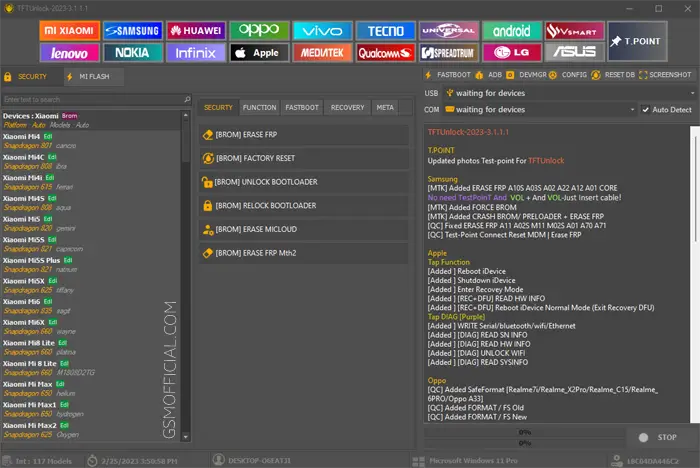
TFT Unlock Tool is designed to simplify the process of unlocking various Android devices. Whether you own a Xiaomi, Samsung, Huawei, Oppo, or Vivo, this tool supports them all and allows you to perform essential tasks like:
- Writing stock ROM
- Resetting screen locks
- FRP (Factory Reset Protection) unlocking
- And much more!
Tools Key Features
TFT Unlock Tool V7 Key Features:
- Device Compatibility: Supports a wide array of Android devices including Xiaomi, Samsung, and Huawei.
- One-Click Unlock: Simplifies the unlocking process to just a single click.
- FRP Bypass: Instantly bypass Factory Reset Protection.
- User-Friendly Interface: Intuitive and easy to navigate interface for developers and casual users alike.
- Stock ROM Flashing: Seamlessly flash stock ROMs onto your device.
- Data Recovery: Enables encrypted data recovery without any fuss.
- USB Driver Installed: Automatically install required USB drivers during setup.
- Multi-Language Support: Supports several languages making it accessible for all users.
- Backup Options: Allows user data backup for safety.
- Semi-Automatic Interface: Guides the user stepwise, making it suitable for both novices and experts.
- Tool Updates: Regular updates add features and improve functionality.
- Support Forum: Community support for troubleshooting and tips.
- Free of Cost: No need to pay for basic features.
- Secure Usage: Ensures your data remains secure while working with the tool.
- Cross-Platform: Works on multiple Windows versions.
- Bootloader Unlocking: Supports unlocking of bootloom on devices like Xiaomi.
- Fast Processing Speed: Optimized tool to ensure smooth performance.
- Custom ROM Support: Easily install custom ROMs post-unlock.
System Requirements
| OS | Windows 10 / 11 |
| CPU | 1.5 GHz Dual-core or higher |
| RAM | 2 GB |
| Storage | 15 MB free space needed |
How To Download and Install?
Downloading and installing the TFT Unlock Tool V7 is straightforward:
- Download the Setup: Visit the official site and download the latest version.
- Extraction: Extract the downloaded ZIP file on your PC.
- Installation: Run the installation file and follow the on-screen instructions for installation.
- Driver Setup: Ensure all necessary drivers such as MediaTek and Qualcomm are installed.
- First Launch: Open the tool post-installation and ensure all components load correctly.
Common Errors and Fixes
| Error | Possible Fix |
|---|---|
| Device not detected | Ensure drivers are properly installed. |
| Software crashes | Check system requirements; ensure Windows is up-to-date. |
| Installation failure | Re-download and check for integrity of the downloaded file. |
| Boot loop after flash | Ensure correct stock ROM is being used. |
Performance And Usage of TFT Unlock Tool V7 (Latest Version)
The workflow of this tool is built for speed and efficiency. Users can effortlessly handle unlocking processes without any technical hassle. Upon launching the tool, straightforward menus ensure that even beginners can get accustomed quickly. Once the required drivers are set up, connecting your device and performing the unlocking operation is seamless.
Moreover, the TFT Unlock Tool speeds up the unlocking processes significantly, compared to older versions. The less complicated UI design eliminates many unnecessary steps that would otherwise confuse less experienced users. You just need to follow the straightforward guidelines within the tool.
TFT Unlock Tool V7 (Latest Version) Pros And Cons
- Pros:
- Free to use
- User-friendly interface
- Supports multiple Android brands
- Fast unlocking and flashing
- Regular updates
- Strong community support
- Cons:
- Requires USB drivers installation
- Can be complex for beginners without guidance
- May not support some newer models without updates
- Issues with specific ROMs on certain devices
Related Tool Name must mentioned the name
In the world of mobile tools, users often require various solutions. Besides the TFT Unlock Tool, you can also explore a plethora of other tools such as Halabtech Tool, UMT Huawei Suit, and UMT GSM Tool. Each tool caters to unique functionalities and makes device management a hassle-free experience.
Moreover, tools like Mi Top Tool ease the process of unlocking Xiaomi devices effectively. Understanding various tools can enhance your efficiency in managing Android devices, making sure you choose the right platform for particular needs.
FAQ
What is TFT Unlock Tool?
TFT Unlock Tool is a device management application used mainly for unlocking Android devices.
Is the tool free to use?
Yes, it provides essential features for free, though there may be premium features.
Which devices does it support?
It supports various Android brands including Xiaomi, Samsung, Huawei, Oppo, and Vivo.
Do I need to install drivers?
Yes, you need to install the necessary drivers for proper functionality with the tool.
Can it flash stock ROMs?
Absolutely, it includes options for flashing stock ROMs on supported devices.
Is there an official website for the tool?
Yes, you can visit the official website for more information.
How often is the tool updated?
The tool is updated regularly to fix bugs and add new features.
What should I do if the device is not detected?
Check your USB drivers and ensure that your device is properly connected.
Can I use it on Mac?
The tool primarily supports Windows; there isn’t a Mac version available.
What precautions should I take?
Always back up your data before using the tool, as it might result in data loss.
Conclusion
The TFT Unlock Tool V7 is undeniably a game-changer for anyone looking to manage their Android devices effectively. With its robust features, ease of use, and ongoing updates, it’s a must-have for developers and casual users alike in 2026 and beyond.
Here’s a well-structured extraction of the download links for the TFT Unlock Tool and its old versions, formatted with emojis for better visual appeal:
📥 Download Links for TFT Unlock Tool
Latest Version
| Tool Name | Download Links |
|---|---|
| TFT Unlock Tool V7 (12 MB) | 🔗 Download (MediaFire) 🔗 Download (Google Drive) |
Old Versions
| Version | Link 1 (Mega) | Link 2 (Google Drive) |
|---|---|---|
| 2024-6.1.1.1 | 🔗 Mega | 🔗 G-Drive |
| 2024-5.0.0.0 | 🔗 Mega | 🔗 G-Drive |
| 2024-4.7.3.3 | 🔗 Mega | 🔗 G-Drive |
| 2024-4.7.1.1 | 🔗 Mega | 🔗 G-Drive |
| 2024-4.7.0.0 | 🔗 Mega | 🔗 G-Drive |
| 2024-4.6.4.4 | 🔗 Mega | 🔗 G-Drive |
| 2024-4.6.3.3 | 🔗 AFH | 🔗 G-Drive |
| 2024-4.5.0.0 | 🔗 AFH | 🔗 G-Drive |
| 2024-4.4.2.1 | 🔗 AFH | 🔗 G-Drive |
| 2024-4.4.0.0 | 🔗 AFH | 🔗 G-Drive |
| 2024-4.2.1.1 | 🔗 AFH | 🔗 G-Drive |
| 2024-3.2.0.0 | 🔗 AFH | 🔗 G-Drive |
| 2023-3.1.1.2 | 🔗 AFH | 🔗 G-Drive |
| 2023-3.1.1.1 | 🔗 AFH | 🔗 G-Drive |
| 2022-3.0.0.0 | 🔗 AFH | 🔗 G-Drive |
| 2022-2.0.1.1 | 🔗 AFH | 🔗 G-Drive |
| Digital-1.5.7.7 | 🔗 MediaFire | 🔗 G-Drive |
🔑 Note
Installer & ZIP password is TFT. Make sure to back up your important data before using the tool as it may erase data during the process. Always use the latest version for the best experience!