
 Posted by
 SPD Upgrade Tool R27.25.4601 (Latest version) Complete Guide (2026)
Introduction
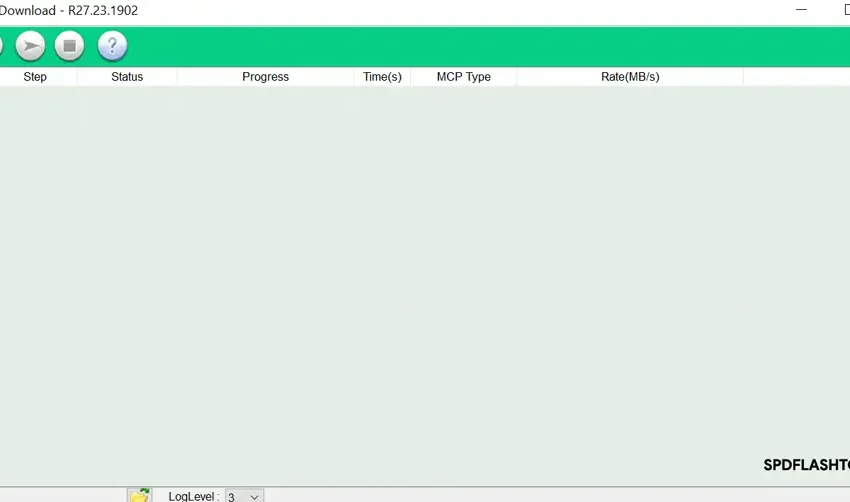
If you’re on the lookout for an efficient tool for your Android devices, then the SPD Upgrade Tool R27.25.4601 is your best bet! This tool provides a reliable offline PC setup, allowing for a seamless standalone installation. Designed to work with Windows 10 and Windows 11, it also supports some older Windows versions. It’s perfect for Indian users who want to download it for PC usage. You can access a free trial or official access to the tool.
What This Mobile Tool Does?
The SPD Upgrade Tool primarily helps users to flash PAC stock ROMs onto their Android devices powered by SpreadTrum SOC. If you’re experiencing device issues or need to perform a factory reset, this tool can come in really handy. It also enables you to reset the FRP lock and screen locks, providing you with a comprehensive solution for device management.
Moreover, for those who enjoy gaming, this tool can be beneficial in upgrading the firmware of your gaming device setups. It ensures that your device remains optimized for the latest games, enhancing your overall performance.
Tools Key Features
- Easy Interface: User-friendly interface for quick navigation.
- FRP Reset: Reset the Factory Reset Protection lock easily.
- PAC Firmware Support: Supports PAC firmware for various devices.
- Accessibility: Available for both 32-bit and 64-bit systems.
- Batch Processing: Allows flashing multiple devices at once.
- Debugging Options: Comprehensive debugging features for developers.
- Standalone Functionality: No need for any additional dependencies.
- Compatible with Multiple Devices: Works on a wide range of SpreadTrum-based Android devices.
- Backup Options: Offers backup solutions for ROMs.
- Language Support: Multi-language support for better user experience.
- Scripting Support: Custom scripts can be used for advanced operations.
- Live Updates: Keeps you updated with the latest features and fixes.
- Error Reporting: Generates detailed logs for troubleshooting.
- Bootloader Unlock: Unlocks bootloader for rooted devices.
- UI Customization: Options to customize the interface according to user preference.
- Installation Guide: Includes tutorial for new users.
- Backup Restoration: Restore previous backups easily.
- Support Community: Active community for resolving user queries.
System Requirements
| OS | Windows 10 / 11 |
| CPU | 1 GHz Intel or AMD processor |
| RAM | Minimum 2 GB (4 GB recommended) |
| Storage | At least 50 MB free space |
How To Download and Install?
To get started with SPD Upgrade Tool, follow these steps:
- Download the latest version zip package from the official website.
- Extract the zip file to a folder of your choice using an extraction tool.
- Run the setup file and follow the on-screen instructions for a standalone installation.
- After installation, launch the tool to start using it.
Common Errors and Fixes
| Error | Fix |
|---|---|
| Device not detected | Ensure USB Debugging is enabled on your device. |
| Installation fails | Check for adequate storage space on your PC. |
| Failed to flash firmware | Ensure the correct PAC file is selected. |
| Driver issues | Install the required USB drivers before using the tool. |
Performance And Usage of SPD Upgrade Tool R27.25.4601 (Latest version)
In practice, the SPD Upgrade Tool has proven to be quite effective in various scenarios. Users can easily flash their devices with the latest PAC firmware. This ensures their devices remain up-to-date and are free of bugs or glitches that may hinder performance. The tool often completes the flashing process in just a few minutes, which is a significant time-saver.
Additionally, for gaming enthusiasts, upgrading the firmware can significantly improve game loading times and enhance the overall gaming experience. Users have reported smoother gameplay and better resource management after using this tool, making it a must-have for serious gamers.
SPD Upgrade Tool R27.25.4601 (Latest version) Pros And Cons
- Pros:
- Efficient and quick firmware flashing.
- User-friendly interface makes it suitable for beginners.
- Supports a wide range of SpreadTrum devices.
- Allow for FRP and screen lock resets.
- Regular updates enhance its functionalities.
- Active user community for support.
- Cons:
- Only compatible with SpreadTrum devices.
- May have compatibility issues with older Windows versions.
- Requires USB drivers to function properly.
- Performance can vary based on PC specifications.
- Some users report errors during flashing.
Related Tool Name
Additionally, you may find interest in other mobile tools like Halabtech Tool and SPD Factory Tool. Both these tools can assist you in managing your device’s software efficiently. If you’re also into Android customization, then Realme Unisoc Upgrade Tool is another great resource. All these options complement the functionalities of the SPD Upgrade Tool, ensuring a comprehensive toolkit for Android device management.
FAQ
1. Can I use this tool on any Android device?
No, it’s specifically designed for devices with SpreadTrum SOC.
2. Is it safe to use?
Yes, as long as you follow the instructions, it’s safe to use.
3. What is the file size of the tool?
The SPD Upgrade Tool R27.25.4601 is approximately 12 MB.
4. How often is the tool updated?
Updates are provided regularly; it’s advisable to check for updates frequently.
5. Can I downgrade my firmware using this tool?
Yes, you can flash older PAC files to downgrade firmware.
6. Do I need a USB driver?
Yes, you need to install the appropriate USB drivers for your device to ensure proper communication.
7. Are there any risks involved in flashing?
There is always a risk; you might void your warranty or brick your device if not done properly.
8. What should I do if my device gets stuck in a boot loop?
You can try flashing the stock ROM again using the SPD Upgrade Tool.
9. Where can I download the tool?
You can download the SPD Upgrade Tool from the official website.
10. Can I use this tool to unlock my device?
Yes, it helps in unlocking FRP locks as well as screen locks.
Conclusion
In conclusion, the SPD Upgrade Tool R27.25.4601 is an essential application for managing your SpreadTrum devices. With its easy-to-use features and comprehensive functionalities, it’s suitable for both novice and advanced users alike. Whether you’re flashing firmware or resetting locks, this tool stands out in the tech landscape for 2026.
Sure! Below is the formatted extraction of the download links with relevant emojis and headings as requested.
📥 Download Links for SPD Upgrade Tool
🔗 Latest Version
| Version | Link |
|---|---|
| R27.25.4601 | Download (MediaFire) 💾 |
| Download (Google Drive) 📂 |
🔙 Older Versions
| Version | Link 1 | Link 2 |
|---|---|---|
| R27.24.2301 | G-Drive ☁️ | Mega 🌐 |
| R27.24.1301 | G-Drive ☁️ | AFH 📥 |
| R27.23.1902 | G-Drive ☁️ | AFH 📥 |
| R27.23.0101 | G-Drive ☁️ | AFH 📥 |
| R26.21.2801 | G-Drive ☁️ | AFH 📥 |
| R25.21.1401 | G-Drive ☁️ | AFH 📥 |
| R24.0.0003 | G-Drive ☁️ | AFH 📥 |
| R23.19.4001 | G-Drive ☁️ | AFH 📥 |
| R22.0.0001 | G-Drive ☁️ | AFH 📥 |
| R21.0.0001 | G-Drive ☁️ | AFH 📥 |
| R20.0.0001 | G-Drive ☁️ | AFH 📥 |
| R19.17.4301 | G-Drive ☁️ | AFH 📥 |
| R17.17.1202 | G-Drive ☁️ | AFH 📥 |
| R17.0.0001 | G-Drive ☁️ | AFH 📥 |
| R4.0.0001 | G-Drive ☁️ | AFH 📥 |
| R2.10.1003 | G-Drive ☁️ | AFH 📥 |
| R2.9.9005 | G-Drive ☁️ | AFH 📥 |
| R2.9.9001 | G-Drive ☁️ | AFH 📥 |
Feel free to reach out if you need any more modifications!