
 Posted by
 UMT Huawei Suit v1.2 Setup File Download for Windows Complete Guide (2026)
Introduction
On this Page We have collected to share the official UMT Huawei Suit v1.2 Setup File for your device for Flashing, Unlocking and Repairing. With this offline PC setup, you can achieve a standalone installation on Windows 10 and Windows 11, and it’s also compatible with older versions of Windows, making it accessible for a broad audience. It allows users to access features without any need for a permanent online connection.
This is essential for Indian users who need reliable PC tools to manage their Huawei devices. For a comprehensive installation guide, you can check out the official site.
What This Mobile Tool Does?
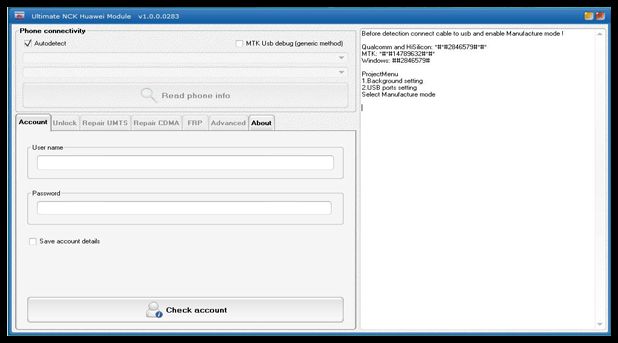
UMT Huawei Suit is a powerful tool specifically designed to cater to Huawei devices. It enables users to flash firmware, unlock their devices, and perform repairs with ease. Especially for gamers, it helps optimize device performance by managing software settings that can impact gameplay. Whether you’re stuck in a boot loop, or your device is locked, this tool has got you covered. Users can effectively manage their Huawei smartphones and optimize their overall experience.
Tools Key Features
UMT Huawei Suit v1.2 Key Features
- Firmware Flashing: Easily flash stock ROMs on Huawei devices.
- Unlocking: Unlock various Huawei models for carrier flexibility.
- Device Repair: Repair issues related to software malfunctions.
- Factory Reset Protection Removal: Effective in bypassing FRP locks.
- Resume Flashing: Resume interrupted flashing processes without hassle.
- Read/Write Data: Read and write necessary data on Huawei devices.
- Backup Feature: Backup important data before flashing or unlocking.
- Compatibility: Supports a wide range of Huawei devices and CPUs.
- Custom ROM Installation: Install custom ROMs to personalize your device.
- Fastboot Mode Support: Operate easily in Fastboot mode for advanced operations.
- Device Formatting: Format devices to remove issues like lock screens.
- User-friendly Interface: Intuitive UI makes it accessible for all users.
- Free Updates: Regular updates ensure smooth functionality.
- Download Manager: Manage and retrieve firmware and tools efficiently.
- Log Files: Save and analyze log files for troubleshooting.
- Multilingual Support: Offers multiple languages for better understanding.
- Multiple Flash Options: Set specific parameters for a customized flashing experience.
- Community Support: Strong online community for troubleshooting help.
System Requirements
| OS | Windows 10 / 11 |
| CPU | Intel Pentium 4 or higher |
| RAM | At least 2 GB |
| Storage | Minimum 100 MB free space required |
How To Download and Install?
To get started with UMT Huawei Suit v1.2, follow these simple steps for offline setup:
- Download: Click on the links provided above to download the setup file.
- Extract: Once downloaded, extract the zip file in your desired folder.
- Install Drivers: Make sure to install the required USB Drivers on your computer.
- Launch Tool: Open the UMT Huawei Suit from the extracted files.
- Connect Device: Put your Huawei device in Fastboot Mode for operations.
Common Errors and Fixes
| Error | Fix |
|---|---|
| Device Not Recognized | Ensure USB drivers are properly installed. |
| Flashing Stuck | Try re-doing the steps in Fastboot Mode. |
| Failed to Unlock | Check if the device’s bootloader is already unlocked. |
| Outdated Tool Version | Check for updates on the official website. |
| Insufficient Storage | Free up space on your device for flashing. |
| Invalid ROM File | Make sure the ROM file is compatible with your device. |
Performance And Usage of UMT Huawei Suit v1.2 Setup File Download for Windows
The UMT Huawei Suit v1.2 has shown impressive performance during various operations. The user interface is seamless, allowing for quick navigation between flashing, unlocking, and other essential features. Users have reported smooth flashing experiences with minimal downtime. Plus, the ability to revert back to stock firmware easily helps ensure that users can recover from any software glitches without a fuss.
For those involved in gaming, this tool can assist in managing system resources effectively. It ensures your Huawei device runs optimally, minimizing lag during intense gaming sessions. By optimizing the software settings through this tool, gamers experience enhanced stability and overall performance.
UMT Huawei Suit v1.2 Setup File Download for Windows Pros And Cons
- Pros:
- Versatile Features for Flashing & Unlocking
- User-friendly Interface for Ease of Access
- Regular Updates and Community Support
- Compatible with Multiple Device Models
- Efficient Performance During Operations
- Free Trial Access Available
- Cons:
- Requires USB Drivers Installation
- Only Windows Compatible
- Limited to Huawei Devices
- Can Have Compatibility Issues with Some Versions
- Need for Basic Technical Knowledge
- Frequent Updates may be Confusing
Related Tools
Alongside UMT Huawei Suit, you might find these tools useful:
If you are looking for MTK USB Driver, check out the Download Mediatek (MTK) USB Driver. For flashing other devices, you can refer to the Download SP Flash Tool for Windows. If you need UMT Qcfire for additional flashing tasks, visit Download Latest UMT Qcfire. Also, keep the Firmware Download feature handy at Dhaka Flash for easy access to firmware files.
FAQ
What is UMT Huawei Suit?
UMT Huawei Suit is a mobile tool used for flashing, unlocking, and repairing Huawei devices.
Is it free to use?
The tool provides a free trial version for users to test before purchasing.
Can I use it on Mac?
No, UMT Huawei Suit only supports Windows operating systems.
What to do if my device is not recognized?
Make sure the USB drivers are installed correctly.
Is flashing safe?
Flashing can be safe if done with the correct firmware and procedure. Always backup data first.
What is FRP?
FRP stands for Factory Reset Protection, a security feature on Android devices that prevents unauthorized access.
Which devices are supported?
The tool supports a variety of Huawei smartphones and tablets.
Can I revert back after flashing?
Yes, you can revert back to stock firmware using UMT Huawei Suit.
How to update the tool?
Regular updates can be downloaded from the official website.
Is a stable internet connection required?
No, this tool operates offline after the initial download and installation.
What if I encounter errors during flashing?
Refer to the error table above for potential fixes.
Conclusion
The UMT Huawei Suit v1.2 stands out in 2026 as a reliable tool for Huawei device management. With its extensive features, it caters to both novice and expert users alike in India and beyond. Effortless firmware flashing, unlocking options, and active community support make it a must-have for anyone looking to enhance their device’s performance or resolve issues efficiently. Don’t hesitate to dive into the world of mobile modifications with this powerful tool!
Sure! Here’s a structured extraction of the download links presented in a user-friendly format, complete with emojis.
📥 Download Links for UMT Huawei Suit v1.2
| Download Host | Link |
|---|---|
| 🥇 Mirror 1 (Mega) | Download UMT Huawei Suit |
| 🥈 Mirror 2 (Google Drive) | Download UMT Huawei Suit |
Feel free to click on the links to download the UMT Huawei Suit setup file!