
 Posted by
 DM FRP Tool v1.0 (DM FRP Bypass Tool) – Latest version Complete Guide (2026)
Introduction
DM FRP Tool v1.0 is a powerful application designed for offline PC setup, allowing users to bypass the FRP lock on their Samsung devices. This standalone installation is compatible with Windows 10 and Windows 11, as well as older versions of Windows. For Indian users, accessing this tool for your PC is essential as it provides a free trial and official access. In this article, we’ll explore everything you need to know about DM FRP Tool v1.0.
To get started, visit this DM FRP Tool page for official download links and tutorials.
What This Mobile Tool Does?
DM FRP Tool v1.0 is primarily designed to help users bypass the Factory Reset Protection (FRP) lock, which is a security feature integrated into Android devices, especially Samsung. This lock can create significant hurdles for users who have purchased second-hand devices or have forgotten their Google account credentials. With this tool, users can easily remain productive without being hindered by these locks.
This tool is especially useful for game developers and testers who wish to reset devices without losing data and to ensure that their applications are working seamlessly across various devices. Imagine you have a demo device with a FRP lock; using DM FRP Tool, you can quickly reset and confirm your app functions perfectly.
Tools Key Features
- Lightweight Application: Easy to download and use without heavy system requirements.
- FRP Bypass: Quickly remove FRP locks from Samsung devices.
- USB Driver Included: Comes with Samsung USB drivers for hassle-free installation.
- Standalone Tool: No need for additional software installations.
- User-Friendly Interface: Simple navigation makes it accessible for all users.
- Supports Multiple Devices: Bypass FRP locks on various Samsung models.
- Offline Functionality: Works without an internet connection once installed.
- Regular Updates: Newest version ensures ongoing support and functionality.
- Compatible with Old Windows Versions: Works on Windows 7 and later.
- Fast Processing: Bypasses lock in just a few clicks.
- Free Trial Version: Users can try before purchasing.
- Easy to Install: Quick and straightforward installation process.
- Detailed Tutorials: Comprehensive guides provided for first-time users.
- No Technical Skills Required: Ideal for non-technical users.
- Full Support: Community and developer support available.
System Requirements
| OS | Windows 10 / 11 |
| CPU | Minimum 2.0 GHz Dual-Core Processor |
| RAM | At least 2 GB or more |
| Storage | 50 MB free space required |
How To Download and Install?
Getting DM FRP Tool v1.0 set up on your PC is straightforward. Here’s how to do it:
- Download the DM FRP Tool on your computer from the provided link.
- Extract the downloaded zip file using WinRAR or 7zip.
- Install the Samsung USB Driver included in the package.
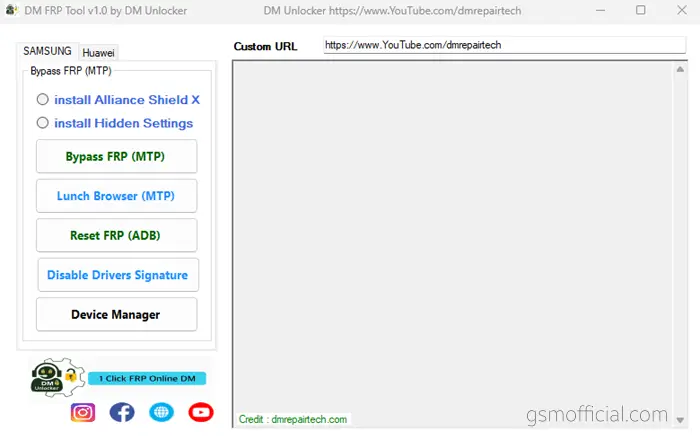
- Open the extracted file (DM_FRP_Tool_v1.0.exe).
- Connect your Samsung device and set it to MTP Mode.
- Click on the ‘Bypass FRP (MTP)’ button to start the process.
- Look at your Samsung device and click on View to complete the process.
Common Errors & Fixes
| Error | Fix |
|---|---|
| Device not recognized | Ensure USB drivers are correctly installed. |
| Tool not opening | Right-click and run as an administrator. |
| FRP bypass failed | Check your device’s internet connection settings. |
| Compatibility issues | Ensure you are using the latest version of the tool. |
Performance And Usage of DM FRP Tool v1.0 (DM FRP Bypass Tool) – Latest version
The real workflow of DM FRP Tool allows users to bypass FRP with ease. Once you follow the straightforward installation process, the time taken to complete the FRP bypass is minimal. Most users report that the tool successfully removes locks within minutes, making it a convenient option for urgent situations.
Moreover, DM FRP Tool supports a variety of Samsung devices, thus offering flexibility for users with multiple devices. The interface is user-friendly, which means even those who are not tech-savvy can manage to utilize it effectively without hassle.
DM FRP Tool v1.0 (DM FRP Bypass Tool) – Latest version Pros And Cons
- Pros:
- Easy to use and highly effective
- No installation issues or dependencies
- Fast FRP bypass process
- Regular updates ensure new features
- Supports a wide range of Samsung devices
- Lightweight with a small file size
- Cons:
- Limited to Samsung devices only
- Windows-based tool only
- Sometimes requires administrator permissions
- May not work with all Android versions
- Learning curve for first-timers
- Occasional connection issues with certain devices
Related Tools
If you are searching for alternatives or additional tools, you might find the following Easy Samsung FRP Tool 2020 and SamFw FRP Tool useful in managing or bypassing FRP locks on different devices. Each alternative comes with its unique benefits, and exploring these can offer a variety of solutions tailored to your needs. Additionally, you can check Huawei FRP Tool by UnlockPrice for another option.
FAQ
What is FRP Lock?
FRP Lock, or Factory Reset Protection, is a security feature on Android devices to protect user data.
Is DM FRP Tool safe to use?
Yes, DM FRP Tool is safe as it is developed by DM Repair Tech, known for their reliable tools.
Can I use this tool on other brands?
No, this tool is specifically designed for Samsung devices only.
How long does the bypass process take?
The bypass process typically completes within minutes.
Is an internet connection required?
Once installed, the tool can operate offline for the bypass process.
Do I need technical skills to use this tool?
No, the tool is designed for ease of use; anyone can utilize it effectively.
What should I do if the tool doesn’t work?
Ensure your device’s drivers are correctly installed and that you follow the instructions accurately.
Can I use this tool on a Mac?
No, DM FRP Tool is only compatible with Windows OS.
Will my data be deleted?
No, using the tool should not delete your data during the bypass process.
How often is the tool updated?
The developers regularly update the tool to address issues and improve performance.
Conclusion
DM FRP Tool v1.0 offers a reliable solution for bypassing the FRP lock on Samsung devices, greatly aiding users in regaining access to their devices. Given its ease of use and powerful features, this tool stands out in the market as a go-to solution in 2026. With continuous updates and community support, it ensures that Samsung device owners remain in control of their technology.
📥 Download Links for DM FRP Tool v1.0
| Version | Download Link |
|---|---|
| v1.0 (Latest) | AFH 🌐 |
| Direct Link 🌐 |
🔗 Additional Resources
- USB Drivers:
📑 More Tools
Feel free to explore the links above to access additional tools and resources!